
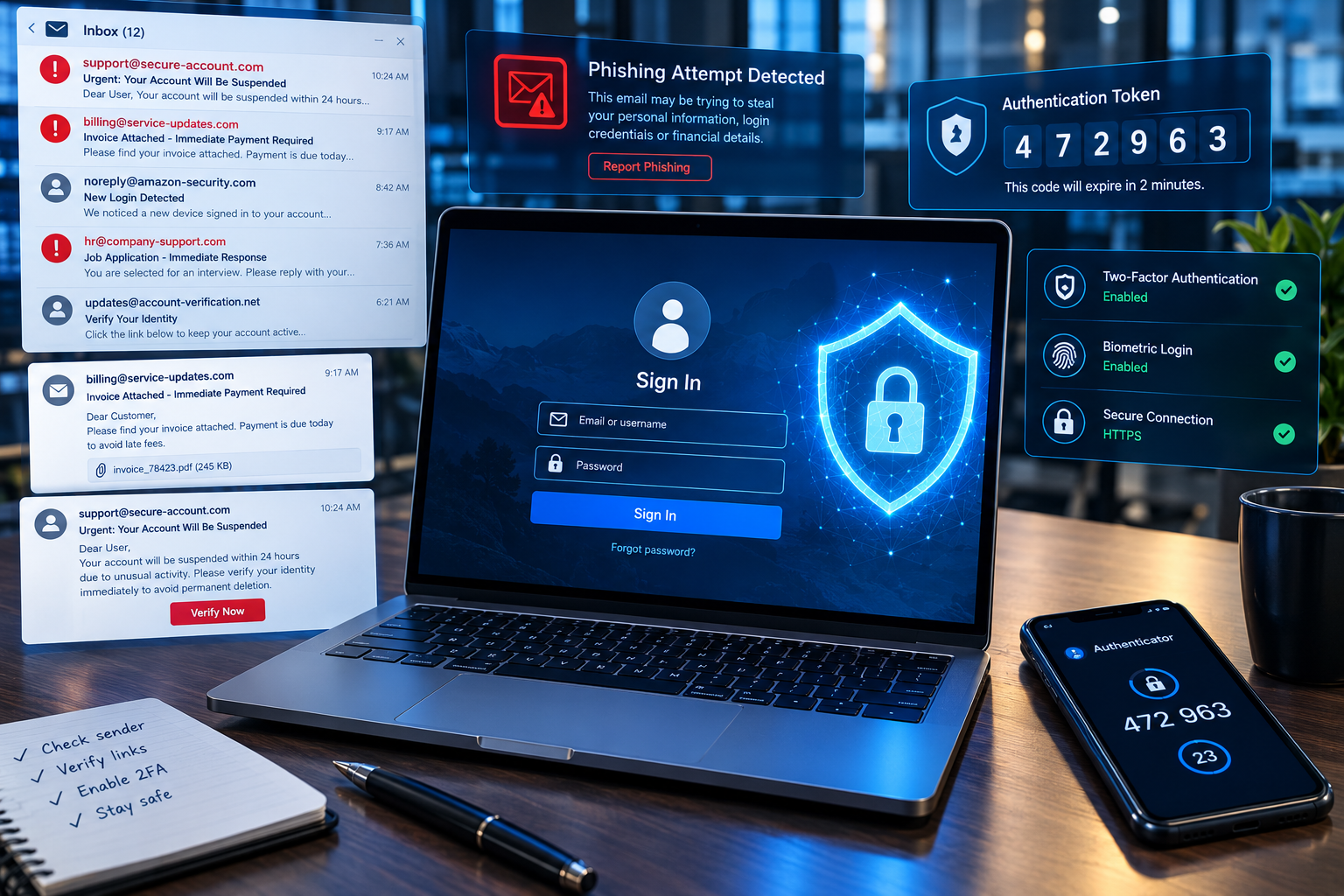
Cybersecurity researchers are warning about a sophisticated phishing-as-a-service operation that uses device-code authentication, automated infrastructure, AI-assisted phishing lures and stolen authentication tokens to compromise organizational accounts.
Microsoft Threat Intelligence published new research on September 22, 2026, detailing a phishing platform called EvilTokens. According to Microsoft, the platform emerged in February 2026 and quickly became one of the more widely used phishing-as-a-service platforms observed by its researchers.
Microsoft says campaigns using EvilTokens compromised more than 12,000 inboxes across more than 10,000 organizations worldwide. The activity affected organizations in industries including financial services, healthcare, higher education, construction, real estate and wholesale distribution.
The campaign is particularly notable because it does not simply rely on stealing a user’s password. Instead, EvilTokens abuses the legitimate device-code authentication process to trick users into authorizing an attacker-controlled session.
This makes the threat relevant to organizations that already use multifactor authentication (MFA), cloud applications and identity-based security controls.
What Is EvilTokens?
EvilTokens is a phishing-as-a-service (PhaaS) platform identified and analyzed by Microsoft Threat Intelligence.
PhaaS refers to services that package phishing infrastructure and capabilities so that other cybercriminals can conduct phishing campaigns without having to build every component themselves.
According to Microsoft, EvilTokens provides tools for creating phishing campaigns, including phishing templates, landing pages, domain and hosting configuration, redirect mechanisms and victim tracking.
Microsoft also reports that the platform includes AI capabilities that can help attackers tailor phishing messages to specific targets.
This is significant because cybercriminals can increasingly obtain ready-made infrastructure rather than developing a phishing operation from scratch.
The result is a lower technical barrier for launching certain types of attacks.
How Device Code Phishing Works
The central technique described by Microsoft is device code phishing.
Device-code authentication is a legitimate authentication method designed for devices that may have limited interfaces.
For example, certain smart TVs, printers, conferencing equipment and other devices may not provide a conventional browser-based sign-in experience.
A user may be shown a short code and instructed to enter it into a browser on another device.
The legitimate authentication flow is useful, but Microsoft explains that its design creates a security tradeoff because the device initiating the authentication and the device completing the authentication are separated.
Attackers can abuse this separation.
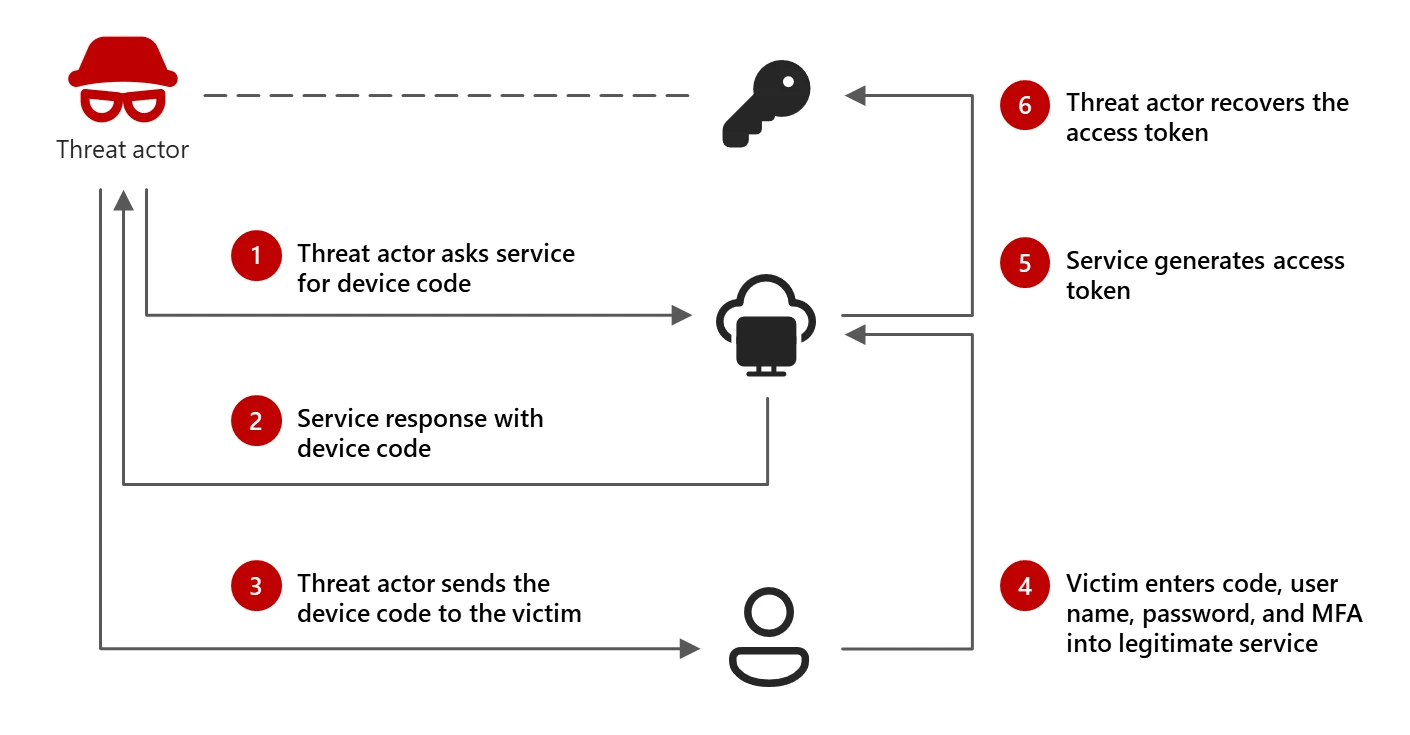
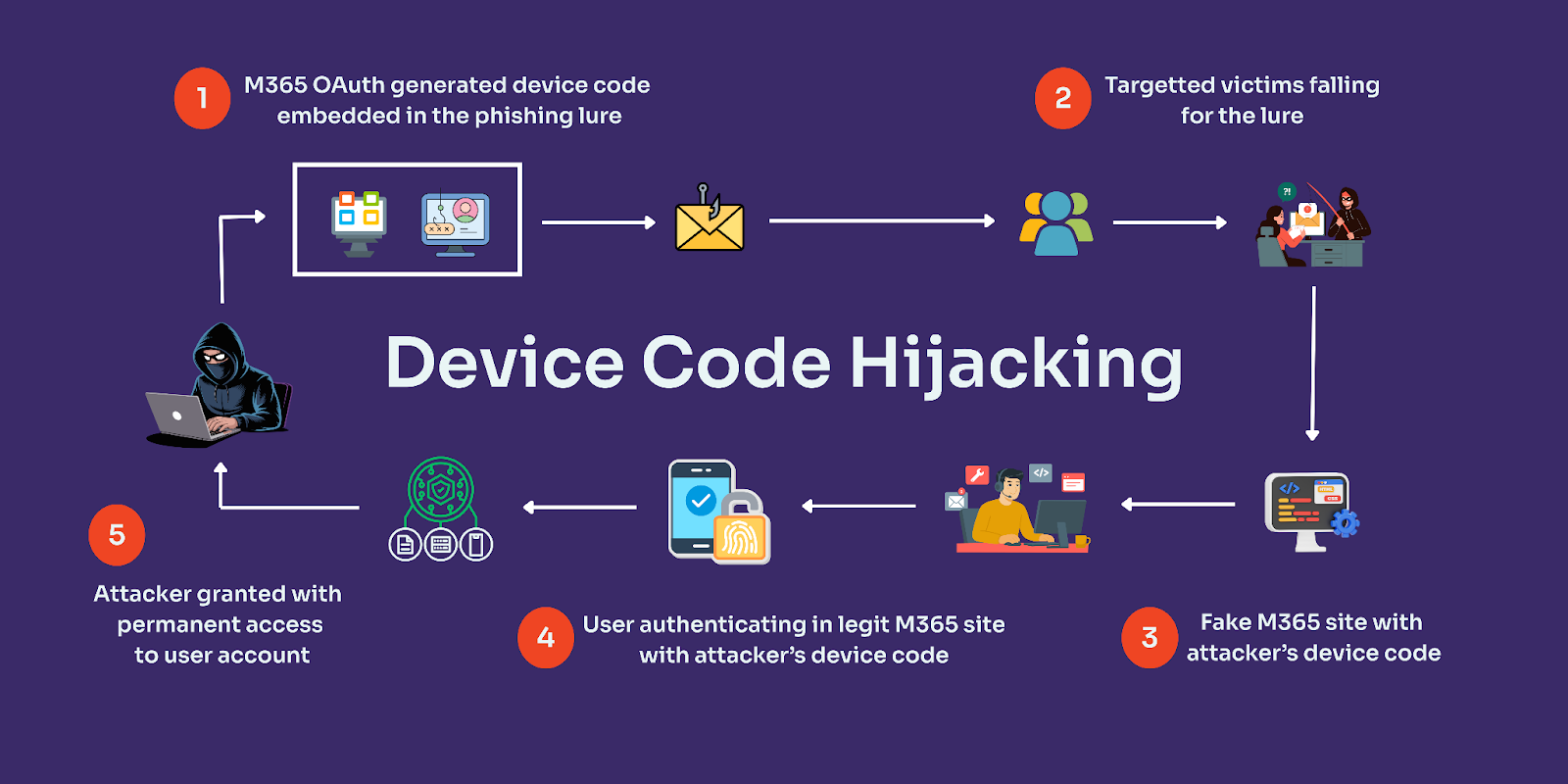
A Simplified Attack Chain
The attack can be understood in several stages:
1. A phishing message reaches the victim
The attacker sends a message designed to create urgency or credibility.
2. The victim interacts with the phishing content
The message may contain a malicious link, PDF or HTML attachment.
3. A device-code request is generated
The attacker initiates a legitimate device-code authentication flow.
4. The victim receives a code
The attacker presents the code through the phishing experience.
5. The victim enters the code on the legitimate authentication website
This is an important part of the attack.
The user may actually interact with a legitimate Microsoft authentication page, which can make the attack more difficult to recognize.
6. The attacker receives the authenticated session
The user has unknowingly authorized the attacker’s session.
According to Microsoft, the attack can therefore obtain access without directly collecting the user’s password.
Why Device Code Phishing Can Be Difficult to Detect
One reason this technique is interesting is that the user may not see a traditional fake login page.
In some circumstances, the final authentication step takes place on the legitimate Microsoft device-login website.
The victim may believe they are completing a normal sign-in or verification process.
Microsoft explains that threat actors use social engineering to disguise what the device-code approval actually represents.
This creates an important cybersecurity lesson:
A legitimate authentication website does not necessarily mean that the authentication request itself is legitimate.
Users need to understand what application or device they are authorizing, not simply whether the website looks genuine.
How EvilTokens Uses AI
Microsoft says EvilTokens includes AI-assisted capabilities for creating targeted phishing lures.
The platform can help attackers tailor emails according to the target’s role and available information.
Microsoft also reports that, after compromising an inbox, EvilTokens can assist attackers in analyzing mailbox activity and using accessible email content to engineer additional phishing messages.
This illustrates an important development in cybercrime.
AI does not necessarily have to perform the entire attack.
Instead, it can assist attackers with individual parts of an existing attack chain.
For example, AI can potentially help with:
- Creating customized phishing messages
- Adapting messages to a target’s role
- Analyzing compromised mailbox information
- Generating variations of social-engineering content
- Automating repetitive tasks
The exact capabilities available to an attacker depend on the platform and campaign.
What Types of Phishing Emails Does EvilTokens Use?
Microsoft observed multiple themes in EvilTokens campaigns.
The company says its researchers identified 44 different phishing themes, including:
- Invoices
- Requests for proposals
- Shared documents
- Document-signing services
- Microsoft cloud services
- File-hosting services
- Payment and invoicing services
- Voicemail notifications
- eFax-related messages
Microsoft also cites research from Huntress describing themes involving construction proposals, business agreements, employee benefits and password-expiration notifications.
The common characteristic is that these messages are designed to look relevant to normal business activity.
That makes them more difficult to identify using simple visual clues.
EvilTokens and Token Theft
Traditional phishing often focuses on stealing usernames and passwords.
EvilTokens demonstrates why modern identity security must also consider authentication tokens.
A successful device-code phishing attack can allow an attacker to obtain authentication tokens associated with the compromised session.
Microsoft says stolen tokens were used for activities including email access and persistence.
In some observed cases, attackers created malicious inbox rules to hide communications. Microsoft also observed scenarios in which tokens were used to help register new devices and maintain access.
This is why token security has become an increasingly important component of cloud security.
What Happens After an Account Is Compromised?
A compromised account may become more than just an isolated security incident.
According to Microsoft’s analysis of EvilTokens, attackers can use compromised access to:
- Read mailbox information
- Search for valuable communications
- Identify organizational relationships
- Examine Microsoft Graph information
- Create malicious inbox rules
- Maintain persistence
- Collect sensitive information
- Conduct additional phishing activity
Microsoft says EvilTokens can help attackers perform Microsoft Graph reconnaissance to understand organizational structure and permissions.
This means that one compromised identity can potentially become a starting point for a broader business email compromise operation.
Why MFA Does Not Automatically Stop This Attack
Multifactor authentication remains an important security control.
However, device-code phishing demonstrates that simply having MFA enabled does not mean every phishing technique will be blocked.
In this scenario, the victim can complete a legitimate authentication process while unknowingly authorizing an attacker’s session.
The attacker is therefore abusing the authentication workflow rather than simply attempting to guess or steal an MFA code.
This distinction is important for security teams.
Organizations need to consider:
- Which authentication methods are enabled
- Which users can use device-code authentication
- Which applications can request authentication
- How unusual authentication activity is detected
- How tokens are monitored and revoked
- Whether high-risk authentication flows should be restricted
Microsoft Recommends Blocking Device Code Flow Where Possible
Microsoft’s guidance for defending against EvilTokens includes restricting device-code authentication.
The company recommends blocking device-code flow wherever possible.
If an organization requires device-code authentication for specific devices, Microsoft recommends limiting exceptions to the necessary resources and configuring Conditional Access appropriately.
This is an important example of security moving toward a principle of least privilege.
If a particular authentication flow is not required by users, there may be little reason to leave it broadly available.
How Organizations Can Protect Against EvilTokens
Microsoft provides several defensive recommendations.
1. Restrict Device-Code Authentication
Organizations should determine whether device-code authentication is actually required.
Where it is not necessary, Microsoft recommends blocking it.
Where it is required, organizations should limit its use to specific legitimate scenarios.
2. Strengthen Anti-Phishing Policies
Email security systems should be configured to identify:
- Spoofed senders
- Impersonation
- Suspicious links
- Malicious attachments
- High-risk phishing patterns
Microsoft specifically recommends anti-phishing policies and Safe Links protections for organizations using Microsoft Defender for Office 365.
3. Educate Employees
Security awareness remains important.
Employees should be taught to question unexpected authentication requests, particularly when a message asks them to:
- Enter a device code
- Approve an unfamiliar application
- Sign in through an unexpected workflow
- Open an attachment
- Click a link from an external sender
- Confirm an urgent account request
4. Monitor Suspicious Inbox Rules
Attackers may create inbox rules after gaining access.
These rules can potentially hide emails from the victim or redirect messages.
Security teams should therefore monitor unexpected inbox-rule creation, especially after unusual authentication activity.
5. Monitor Unusual Microsoft Graph Activity
Microsoft identifies anomalous Microsoft Graph API activity as another useful detection signal.
A sudden increase in Graph activity following suspicious authentication could warrant investigation.
6. Revoke Compromised Sessions
If an account is believed to have been compromised, security teams should follow their incident-response procedures and revoke appropriate sessions or tokens.
Microsoft notes that standard session revocation may not immediately invalidate every existing access token, so organizations should consider additional containment measures based on the circumstances.
Microsoft Defender Detections
Microsoft says Microsoft Defender provides detections covering several stages of the EvilTokens attack chain.
These include detection capabilities related to:
- Anomalous OAuth device-code authentication
- Token exchange following device-code authentication
- Potential device-code phishing
- Suspicious device registration
- Abnormal Microsoft Graph activity
- Suspicious inbox-rule creation
Microsoft Defender XDR can coordinate security signals across endpoints, identities, email and applications.
For organizations already using the Microsoft security ecosystem, these detections can help security teams investigate suspicious activity.
The Role of Microsoft Security Copilot
Microsoft also highlights Microsoft Security Copilot as a tool that can assist security teams with investigation and response.
According to Microsoft, Security Copilot can help summarize incidents, analyze files and scripts, investigate identities, generate hunting queries and support incident reports.
Microsoft also lists specialized Security Copilot agents for tasks such as threat intelligence, phishing triage and threat hunting.
This reflects another major cybersecurity trend: defenders are also using AI to analyze and respond to increasingly automated attacks.
However, AI-based security tools should complement rather than replace security controls, monitoring and human investigation.
EvilTokens Is Part of a Larger Phishing Trend
EvilTokens should not be viewed as an isolated cybersecurity event.
Microsoft’s threat intelligence portal currently tracks phishing, social engineering, business email compromise, cloud threats, AI threats and other categories of attacks.
Recent Microsoft research has also covered:
- AI-assisted executive impersonation
- Passkey-themed social engineering
- Fake IT-support attacks
- Counterfeit software installers
- AI-themed phishing campaigns
- Unicode-based phishing evasion
Together, these reports show how attackers are increasingly combining social engineering with cloud services, identity systems and automation.
What Individual Users Should Do
You do not need to be a cybersecurity professional to reduce your risk.
Be Careful With Unexpected Authentication Requests
If an email suddenly asks you to enter a device code, stop and verify why the request exists.
Do not assume that an official-looking authentication page means the request itself is safe.
Avoid Login Links in Unexpected Emails
Instead of clicking a link in an unexpected message, open the relevant service directly using a known bookmark or manually entered address.
Check the Application Being Authorized
When an authentication process tells you which application or service is being authorized, pay attention to that information.
If the application does not match what you intended to use, stop.
Report Suspicious Messages
If you receive a suspicious business email, report it through your organization’s security process rather than simply deleting it.
Use Strong Authentication
Where supported, organizations should consider phishing-resistant authentication methods and carefully configure identity policies.
Keep Recovery Information Secure
Recovery email addresses, authentication devices and other account-recovery mechanisms should receive the same security attention as primary credentials.
What Businesses Should Watch For
Security teams should pay particular attention to combinations of signals rather than isolated events.
For example:
Unusual sign-in + device-code authentication + new device registration
can be more significant than any one of those events alone.
Likewise:
Suspicious authentication + unusual Graph activity + new inbox rule
may deserve investigation.
Microsoft’s EvilTokens research specifically highlights several of these post-authentication behaviors as detection opportunities.
This reinforces the importance of correlation across identity, email and cloud telemetry.
The Bigger Cybersecurity Lesson
The EvilTokens campaign demonstrates how attackers can abuse legitimate technology instead of relying entirely on traditional malware.
Device-code authentication is legitimate.
Microsoft authentication infrastructure is legitimate.
Cloud APIs are legitimate.
Email systems are legitimate.
AI tools are legitimate.
The security problem arises when attackers combine legitimate technologies with social engineering and unauthorized objectives.
This is one reason modern cybersecurity increasingly focuses on identity, authorization, behavior and context.
Security teams cannot simply ask:
“Is this application legitimate?”
They also need to ask:
“Is this action expected?”
“Who initiated it?”
“Why is this user requesting it?”
“Does this authentication match the user’s normal behavior?”
“What happened immediately afterward?”

Future of Device Code Phishing
The EvilTokens research suggests that phishing operations are becoming increasingly automated and commercially packaged.
Microsoft describes EvilTokens as providing attackers with ready-made templates, infrastructure, AI-assisted lure generation and tools for post-compromise activity.
That trend could make identity-based attacks more scalable.
At the same time, organizations are developing stronger authentication, improved identity analytics, automated detection and AI-assisted security operations.
The future of phishing defense will therefore likely depend on multiple layers working together:
- Phishing-resistant authentication
- Conditional Access
- Identity monitoring
- Email security
- Token protection
- Endpoint security
- User awareness
- Automated detection
- Rapid incident response
No single control should be expected to stop every phishing technique.
Frequently Asked Questions
What is EvilTokens?
EvilTokens is a phishing-as-a-service platform analyzed by Microsoft Threat Intelligence. Microsoft says it provides cybercriminals with capabilities including AI-assisted phishing lures, device-code phishing infrastructure and tools for post-compromise activity.
What is device code phishing?
Device code phishing abuses a legitimate authentication flow intended for devices with limited interfaces. An attacker initiates the authentication process and tricks a victim into entering or approving a code, which can authenticate the attacker’s session.
Can device code phishing bypass MFA?
Device-code phishing can abuse the authentication process even when MFA is involved. Microsoft describes EvilTokens campaigns in which victims completed authentication while unknowingly authorizing an attacker-controlled session.
How many organizations were affected by EvilTokens?
Microsoft reports that EvilTokens-related activity compromised more than 12,000 inboxes across more than 10,000 organizations worldwide. This figure represents Microsoft’s observed campaign activity, not a measurement of all phishing activity globally.
How can businesses protect against EvilTokens?
Microsoft recommends blocking device-code authentication where possible, restricting necessary exceptions, strengthening anti-phishing controls, using Safe Links, monitoring suspicious authentication and inbox-rule activity, and following appropriate incident-response procedures.
Does a legitimate Microsoft login page mean an authentication request is safe?
Not necessarily. Device-code phishing can involve the victim interacting with Microsoft’s legitimate authentication infrastructure while unknowingly authorizing an attacker-controlled session.
Can AI be used in phishing attacks?
Yes. Microsoft reports that EvilTokens includes AI capabilities for tailoring phishing lures and analyzing compromised mailbox information. AI can therefore assist parts of a phishing operation, although the exact attack capabilities vary by campaign.
What should I do if I suspect my account was compromised?
Immediately follow your organization’s security or account-recovery procedure. For business accounts, contact the security or IT team, avoid continuing suspicious sessions and follow established procedures for session/token revocation and account containment.
Final Thoughts
The latest EvilTokens research shows how modern phishing is moving beyond simple fake-password pages.
Attackers are increasingly targeting identity sessions, authentication flows and access tokens.
Microsoft’s September 22, 2026 research describes a PhaaS platform that combines device-code phishing, AI-assisted social engineering, automated infrastructure and post-compromise capabilities. Microsoft says the observed activity compromised more than 12,000 inboxes across more than 10,000 organizations.
For businesses, the key lesson is that MFA alone should not be treated as the entire identity-security strategy.
Organizations should evaluate authentication flows, restrict unnecessary device-code access, monitor identity and cloud activity, protect email accounts and establish rapid response procedures.
For everyday users, the most important habit is simple: do not approve an authentication request unless you understand exactly what you are authorizing and why.
As phishing-as-a-service platforms become more automated, cybersecurity will increasingly depend on combining strong authentication, intelligent monitoring and informed human decisions.