
Cyber security advice has a volume problem. Between vendor blogs, news alerts about the latest breach, and well-meaning relatives forwarding warnings, ordinary users are told to do hundreds of things. Most of them quietly give up, and the ones who don’t often spend their effort on low-impact tasks while leaving the doors wide open.
The reality is less dramatic. Most successful attacks against individuals and small organizations rely on a short list of weaknesses: stolen or reused passwords, convincing fake messages, unpatched software, and missing backups. If you handle those four areas well, you’ve dealt with most of the realistic risk.
This guide is organized around how attacks actually unfold, rather than a checklist of everything that could theoretically go wrong. You’ll learn what attackers want, the common paths they take, and which defenses give you the most protection for the least effort.
What Cyber Security Really Means
Cyber security is the practice of protecting devices, accounts, networks, and data from unauthorized access, damage, or theft. For a large company, that involves security teams, monitoring tools, and compliance requirements. For a person or a small business, it comes down to a smaller set of decisions: how you log in, what you click, how you update, and what happens when something goes wrong.
It helps to think of security as three goals that security professionals commonly describe as confidentiality, integrity, and availability:
- Confidentiality: Only the right people can see your information.
- Integrity: Your information hasn’t been secretly altered.
- Availability: You can still get to your information when you need it.
Ransomware, for example, is mostly an attack on availability. A stolen email password is an attack on confidentiality. Keeping all three in mind stops you from focusing only on “hackers stealing things” and forgetting that losing access to your own files can be just as damaging.
What Attackers Are Usually After
Movies suggest attackers choose victims for a reason. In practice, a great deal of cybercrime is opportunistic and automated. Criminals send the same fake message to enormous numbers of people and see who responds, or they test leaked passwords against many sites and see which ones work.
Their goals are usually practical:
- Money, through fraud, extortion, or stealing payment details
- Access, because a hijacked email or social account can be resold or used to scam your contacts
- Data, including identity details that can be used to open accounts or commit fraud
- Computing resources, such as using your device as part of a larger criminal network
This has an important consequence. You don’t need to be interesting to be targeted. You only need to be reachable and, ideally, easy.
The Four Weak Points Behind Most Incidents
1. Passwords that are weak, reused, or already leaked
When a website is breached, the stolen email and password combinations often circulate among criminals. They then try the same combinations on other services, a technique commonly called credential stuffing. If you reuse a password, one breach at a minor website can unlock your email, and from your email, almost everything else through password resets.
The fix is unglamorous but effective: a unique password for every account, stored in a password manager. You then only need to remember one strong master password. Major operating systems and browsers include built-in password managers, and dedicated options exist too. Choose one from an established provider and check its official documentation for how it protects your data.
2. Missing second layers of login protection
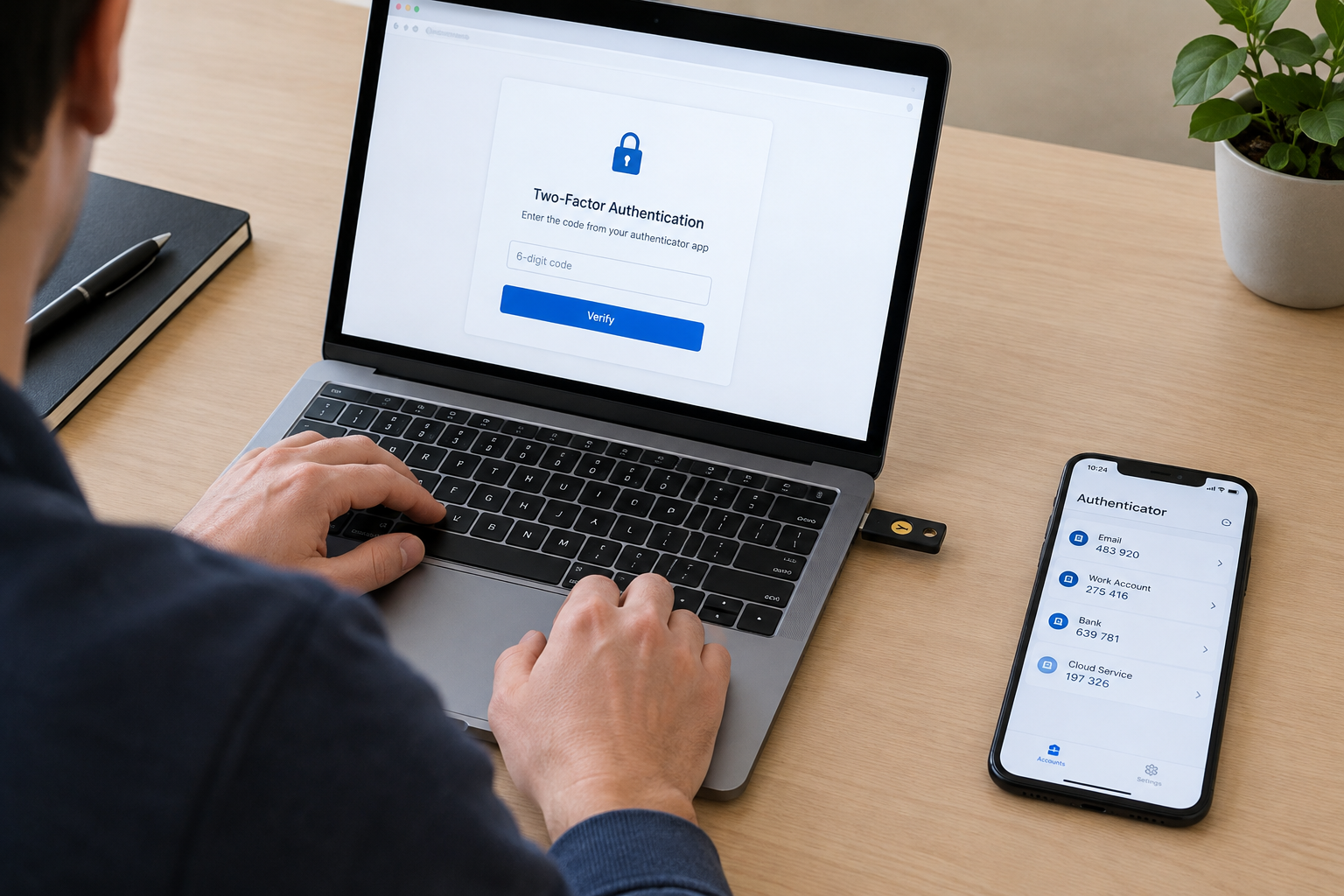
Two-factor authentication (2FA), sometimes called multi-factor authentication, requires something beyond your password, such as a code or a physical key. Even if a criminal obtains your password, they’re blocked without that second item.
Not all second factors are equal. Text message codes are better than nothing, but they can be intercepted through techniques like SIM swapping. Authenticator apps are generally stronger. Hardware security keys and passkeys, which are built on the FIDO Alliance’s standards, are more resistant to phishing because they are tied to the genuine website. Where a service supports passkeys or security keys, they’re worth considering, especially for email, banking, and your main cloud accounts.
Prioritize your email account above everything else. It’s the master key for password resets across your digital life.
3. Phishing and social engineering
Phishing remains one of the most common ways in. The attacker doesn’t break into anything. They persuade you to hand over access willingly, through a message that looks like it’s from your bank, a delivery company, your employer, or a colleague.
Good phishing messages create urgency or fear: your account will be closed, a payment failed, a package can’t be delivered, the boss needs gift cards right now. The pressure is the tell. Legitimate organizations rarely demand immediate action through a link in an unexpected message.
Some practical habits help more than trying to spot every fake:
- Don’t use the link in the message. Open the company’s app or type its address yourself.
- Verify through a second channel. If a “colleague” asks for money or sensitive data, call them on a number you already have.
- Slow down on anything urgent. Urgency is a manipulation tool, not evidence of legitimacy.
- Be careful with attachments you didn’t expect, even from known senders, since their accounts may be compromised.
Phishing now arrives through text messages, messaging apps, social media, and even phone calls, not only email. Voice and image generation tools have also made impersonation more convincing in some cases, so the habit of verifying through a trusted channel matters more, not less.
4. Out-of-date software
Software contains flaws, and when vendors discover them, they release updates to fix them. Attackers study those fixes and target people who haven’t installed them. An unpatched device is effectively running with a publicly documented weakness.
Turn on automatic updates for your operating system, browser, and the apps you use most. For routers and smart home devices, check the manufacturer’s support page, since these often don’t update themselves and are frequently neglected. If a device no longer receives security updates from its maker, consider replacing it, especially if it holds sensitive data or sits on your main network.
CISA, the US Cybersecurity and Infrastructure Security Agency, maintains a Known Exploited Vulnerabilities catalog. It’s aimed mainly at organizations, but it illustrates a useful point: a significant share of real attacks use flaws that already have fixes available.

Ransomware and Why Backups Matter
Ransomware encrypts your files and demands payment to restore access. It has affected hospitals, schools, local governments, and small businesses, as well as individuals. Paying doesn’t guarantee recovery, and it may encourage further attacks, which is why law enforcement agencies generally discourage it.
Your best defense isn’t a clever tool. It’s a good backup, ideally following the widely used 3-2-1 approach:
- Keep three copies of important data
- On two different types of storage
- With one copy stored offsite or offline
The offline part is critical. If a backup drive is permanently connected, ransomware may encrypt it along with everything else. Just as important, test restoring a file now and then. A backup you’ve never tried to recover from is an assumption, not a plan.
What to Do If Something Goes Wrong
Even careful people get caught. A calm, quick response limits the damage.
- Disconnect the affected device from the internet if you suspect malware or ransomware.
- Change passwords from a different, clean device, starting with email and financial accounts.
- Contact your bank or card provider if payment details or money may be involved.
- Enable or review 2FA on compromised accounts and check for unfamiliar login activity or forwarding rules in your email.
- Report it. In the US, the FTC’s reporting site and the FBI’s Internet Crime Complaint Center are official channels. Other countries have their own national agencies, such as the UK’s National Cyber Security Centre.
Don’t be embarrassed about reporting. Scam operations are professional and well-funded, and speed matters more than pride.
Protecting a Small Business or Home Office
If you run a small business or work from home, the same fundamentals apply, but a few extra points deserve attention.
- Separate work and personal use where possible, including accounts and devices.
- Limit access. Staff should only have access to what their role requires.
- Secure your router by changing default admin credentials and keeping its firmware updated.
- Train people on phishing. Employees are often the actual target, and a short, regular conversation beats a long, forgotten policy document.
- Write down a basic response plan, including who to call and how to restore from backup.
The UK’s National Cyber Security Centre and the US National Institute of Standards and Technology (NIST) both publish free guidance written specifically for smaller organizations. They’re good starting points that don’t assume you have a dedicated security team.
What Doesn’t Deserve Your Worry (or Your Money)
Some popular advice delivers less than it promises.
Frequent forced password changes. Current guidance from NIST has moved away from requiring regular password changes without a reason, because it pushes people toward weak, predictable patterns. Change a password when there’s evidence of compromise, not on an arbitrary schedule.
Relying on antivirus alone. Security software helps, but it’s one layer. Built-in protections in modern operating systems, such as Microsoft Defender on Windows, are adequate for many home users, though your needs may vary. No product replaces updates, backups, and cautious habits.
Assuming a VPN makes you anonymous or invulnerable. A VPN encrypts your connection and hides your traffic from the local network, which is useful on public Wi-Fi. It doesn’t protect you from phishing, malicious downloads, or reused passwords, and it shifts trust to the VPN provider.
“Private browsing” as protection. It mainly prevents your browser from saving history locally. It doesn’t hide you from websites or your internet provider.
A Realistic Priority Order
If you only have an afternoon, here’s where I’d spend it, ranked by impact:
- Secure your email account with a strong unique password and 2FA.
- Set up a password manager and begin replacing reused passwords, starting with banking and shopping accounts.
- Turn on automatic updates everywhere you can.
- Set up a backup with at least one offline or offsite copy.
- Learn the phishing pattern: urgency, unexpected requests, and links you didn’t ask for.
Everything after that is refinement. These five steps address the situations that cause the most real-world harm.
Final Thoughts
Cyber security can feel like a contest you can’t win, but that framing is misleading. You don’t have to outsmart a determined government-level adversary. You have to avoid being the easiest target in a very large pool, and that’s achievable with habits most people can build in a weekend.
The threats will keep changing, and new technologies will bring new scams. The foundations, though, stay remarkably consistent: protect your logins, be skeptical of pressure, keep software current, and back up what you can’t afford to lose. Start there, and revisit your setup every few months as your accounts and devices change.
Frequently Asked Questions
What is the single most important cyber security step for an ordinary person?
Securing your email account with a unique password and two-factor authentication. Email is used to reset passwords for nearly everything else, so protecting it protects most of your other accounts as well.
Is a password manager safe to use?
For most people, it’s considerably safer than reusing passwords or storing them in notes. Choose a reputable provider, use a strong master password, and enable 2FA on the manager itself. Check the provider’s official documentation to understand how it encrypts your data.
Do I need antivirus software?
Modern operating systems include built-in protections that are sufficient for many home users. Additional security software can add features, but it doesn’t replace updates, backups, and careful behavior. Needs differ for businesses and for people who handle sensitive data.
How can I tell whether an email or text is phishing?
Look for urgency, unexpected requests, mismatched sender addresses, and links or attachments you weren’t expecting. When unsure, don’t click. Contact the organization using the website or phone number you already know, not the details in the message.
Should I ever pay a ransomware demand?
Law enforcement agencies generally advise against it, as payment doesn’t guarantee your files will be restored and may fund further crime. Regular, tested backups are the better protection. If you’re attacked, report it to the relevant authorities and seek professional help.
How often should I update my devices?
Enable automatic updates so it happens without you thinking about it. For devices that don’t update automatically, such as some routers, check the manufacturer’s support page every few months.